Reproduce a Bug That Only Happens for One Customer
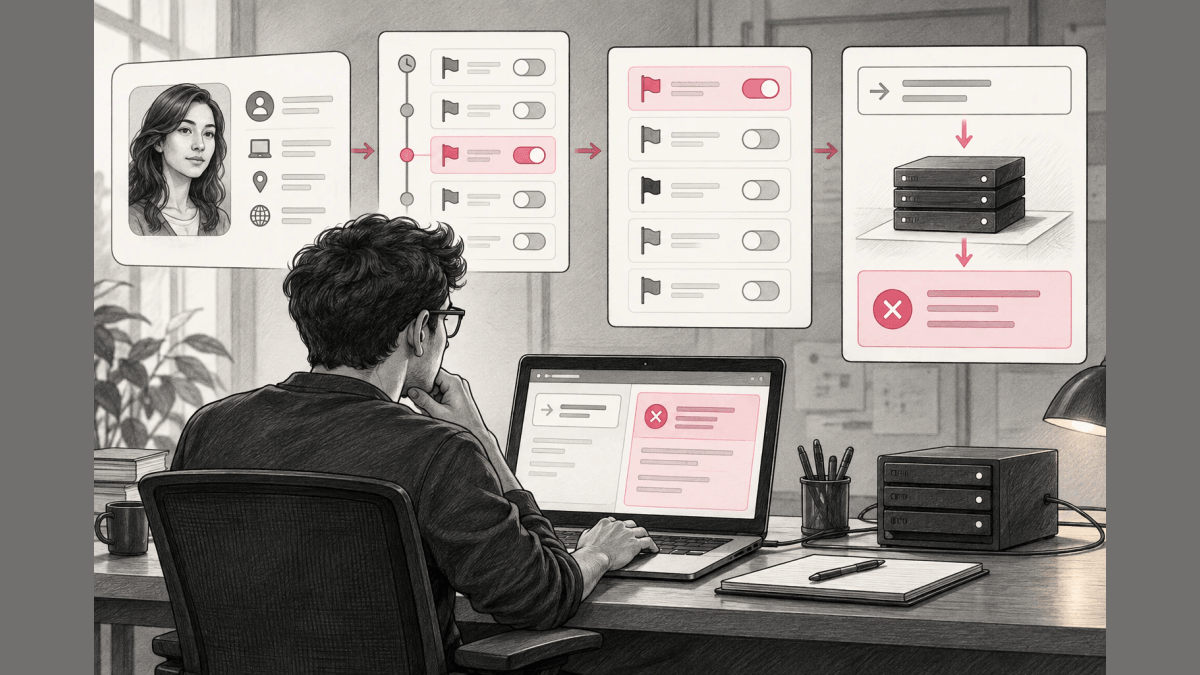
- 01 Record
- 02 Fold
- 03 Replay
- 04 Launch
When a bug shows up in only one customer’s account and every customer runs the same code, the difference is in that customer’s inputs, and their configuration is one of them. Their feature flags, plan, and settings combine into a state your own environment never recreates, and by the time you sit down to reproduce the bug, that state has often changed. The reliable way to reproduce it is to fold the customer’s flag change history back to the exact moment the bug fired, rebuild the ruleset that was live then, and replay that ruleset on infrastructure you already own.
This guide is for developers and support engineers who hold a bug report from one customer and cannot make the failure happen locally. After reading, you can name the moment of the failure by time or by an evaluation record, rebuild the flag state from that moment, and run your code against it in dev, CI, or staging. The guide covers the configuration layer (flags, plan, config). It does not cover intermittent timing bugs, and reproducing the flag evaluation does not by itself prove the root cause of an application failure.
Undo.io reports that “91% of software developers admit to having unresolved defects because these defects cannot be reproduced.” A configuration-specific defect is one of the hardest of those cases, because the failing state lived in the customer’s production flag configuration, which you cannot see from your desk, and that configuration no longer looks the way it did when the report came in.
Why it will not reproduce at your desk
When a defect fires only under one customer’s flag, plan, and config combination, your local environment is evaluating a different state. The code path is the same, but the inputs are not. Support and engineering end up guessing at a configuration they cannot observe, and every “works on my machine” is technically true: you are running the same program against different flags.
The second gap is time, and it is easy to miss. Someone toggled a flag, adjusted a rollout, or edited a targeting rule after the bug was reported, so the state that produced the failure no longer exists to be observed. The goal therefore has two dimensions: get your process to evaluate the customer’s flag state as it was at the moment the bug fired, not as it is now, without touching production and without rebuilding their account by hand.
Own the change history, then fold it to any moment
If the flag platform records every change as it happens, the failing state is never lost and can always be reconstructed. This is the idea behind event sourcing, applied to flag configuration. The path has four steps, and Loglune does the reconstruction for you:
- Record: every edit to a flag, config value, targeting rule, or segment is appended as an immutable event the moment it is made, with who changed what, for which tenant, and when (the same fields an audit log keeps). The account’s state is built from this append-only log and nothing else.
- Fold: to get the state at any past moment T, replay the log up to T. Folding the events in causal order rebuilds exactly the ruleset that was live at that instant, and the fold is deterministic, so the same T always yields the same ruleset.
- Replay: point the same SDK that runs in production at the past version instead of the current one. Loglune evaluates the reconstructed ruleset with the same evaluation engine that answered the production request; only the version differs.
- Launch: run the reproduction in your own dev, CI, or staging environment. The SDK makes the same evaluation request production makes, so there is no shared environment to stand up and wait on.
You do not have to remember to capture anything before the bug happens. Because the history is recorded continuously, the moment T you need is already in the log by the time the report reaches you.
Point at the moment, or at the bug’s own fingerprint
There are two ways to name the moment you want to reproduce:
- By time: pick the timestamp the bug was reported, and Loglune folds the change history to that instant.
- By fingerprint: every evaluation answered through the SDK leaves a record of the ruleset version it used, an opaque key for the context it evaluated, and the variation it returned. Attach that record to the bug report, and reproduction targets the exact version the failing evaluation ran against, with no guessing at the timestamp.
Either way you land on one specific, immutable ruleset version, identified by a monotonic serial and its publish time, and replay resolves to that version alone.
The fingerprint also answers the case where a bug happened once and you cannot recreate it. Record what was unique about that one occurrence and reproduce from the record instead of from memory. Mozilla’s Bug Writing Guidelines say a bug you cannot reproduce is worth reporting only when you “provide unique information about its occurrence.” For a customer-specific bug on flags served by Loglune, that information is the time the failure happened or the evaluation record attached to the report; either one points Loglune at the ruleset version that answered the failing request.
Loglune’s example dataset shows both paths on the boolean flag checkout-v2. The example dataset is synthetic input, labeled Example data in the Loglune console at loglune.com/app and visible without signing in, and it describes no real customer or incident. Its bug-report fingerprint ex-fp-1 records version 2 at August 18, 2026, 13:22 UTC with checkout-v2 = off (reason default), and fingerprint ex-fp-2 records version 3 at August 23, 2026, 07:48 UTC with checkout-v2 = on (reason default). A version bisect (the same halving search as git bisect, run over flag versions instead of commits) for a free-plan customer, judging checkout-v2 bad when it returns on, names the August 20, 2026, 11:15 UTC edit by jordan@example.com that published version 3. The same bisect run at August 18, 2026, 13:22 UTC returns no culprit, because checkout-v2 still returned off then.
Why replaying the real ruleset beats a shared staging clone
A cloned staging environment has to be provisioned, kept in sync with production, and paid for while it sits idle, and it still holds the current configuration, not the one that failed. Replaying the folded ruleset avoids all four problems:
- It runs in the process you already have. Your own dev, CI, or staging run gets the past version’s answers through the same SDK call production makes, so there is no separate environment between you and the bug and no compute for anyone else to host.
- It reconstructs the past, not just the present. Because the state comes from folding an owned history, you can reproduce the configuration as it was at any moment, not only as it is now. A temporal database answers “as of” queries the same way for business data.
- The evaluation is the same one you ship. Live and replay share a single evaluation engine, so the reproduction is not a second, approximate code path.
- It is scoped to flags on purpose. The reproduction targets the configuration layer (flags, plan, config), which is where tenant-specific bugs live.
Why an almost-right replay is worthless
For a debug tool, a reproduction that is close to production tells you nothing. The variation you see in replay has to be the same one production returned at moment T, which requires the evaluation engine to honor the past, not the present:
- Targeting rules are evaluated against the rule set from that version, the folded one, not whatever the rules say today.
- Percentage rollouts bucket each context by MurmurHash3 (32-bit, seed 0) over the flag key followed by the bucketing key, the same hash flagd’s fractional operation uses, so the same context lands in the same bucket in the live evaluation and in every replay.
- Time-dependent rules (date conditions, schedules) are evaluated at the reproduction point T, not the wall-clock time you happen to run the replay.
- Flag dependencies (prerequisites) are resolved in the causal order recorded in the log.
Get those four right and the replayed evaluation matches production bit for bit. Loglune guarantees that exact flag evaluation; finding the root cause of the application failure is still your debugging work.
Reproduce it in one step with Loglune
Loglune is a feature-flag platform, and it runs exactly this pipeline. You define and publish your flags, config, and targeting in Loglune; your app gets every answer from Loglune through the Loglune SDK; and every change is recorded as an owned, append-only event. When a tenant-specific bug comes in, you pick the tenant and the moment (a timestamp or the bug report’s evaluation fingerprint), and Loglune folds the history to that point, rebuilds the exact ruleset that was live, and replays it into the infrastructure you already maintain.
Nothing is captured from another vendor’s system, and Loglune is not a wrapper around another flag provider. Because Loglune owns the flag state and its full history, the past can always be reconstructed. If you are weighing a move off your current flag vendor, the comparison of LaunchDarkly alternatives by pricing, hosting, and past-state reproduction lays out where Loglune fits next to seven other platforms.
Billing follows the work: Loglune counts one replay delivery as one reproduction, metered per run with no idle-hour charge, and the pricing is per reproduction rather than per environment-hour. In Loglune’s example dataset, the reproduction history for August 2026 lists 3 reproductions: two of version 3 and one of version 2.
FAQ
What does reproducing a bug mean?
Reproducing a bug means making the reported failure happen again on purpose, on a machine you control, by repeating the steps and inputs that produced it. Mozilla’s Bug Writing Guidelines call steps to reproduce “the most important part of any bug report” and ask reporters to say whether they can reproduce the bug at will, occasionally, or not at all. For a bug that fires for one customer, the inputs include that customer’s flag configuration at the moment of the failure, which is why the reproduction above folds the change history to that moment.
Why does reproducing a bug matter?
A reproduced bug is one a developer can fix and then confirm as fixed. Mozilla’s Bug Writing Guidelines state that “If a developer is able to reproduce the bug, the bug is very likely to be fixed,” and that with unclear steps “it might not even be possible to know whether the bug has been fixed.” Undo.io reports that 91% of software developers admit to having unresolved defects because those defects cannot be reproduced.
Reproduce a bug that only happens for one customer
Pick the tenant and the moment the bug fired. Loglune folds that tenant's change history to that moment and replays the exact ruleset into your dev, CI, or staging. The Free plan includes 5 reproductions and stops at the cap.