Bitemporal Data: Correct the Past, Keep the Record
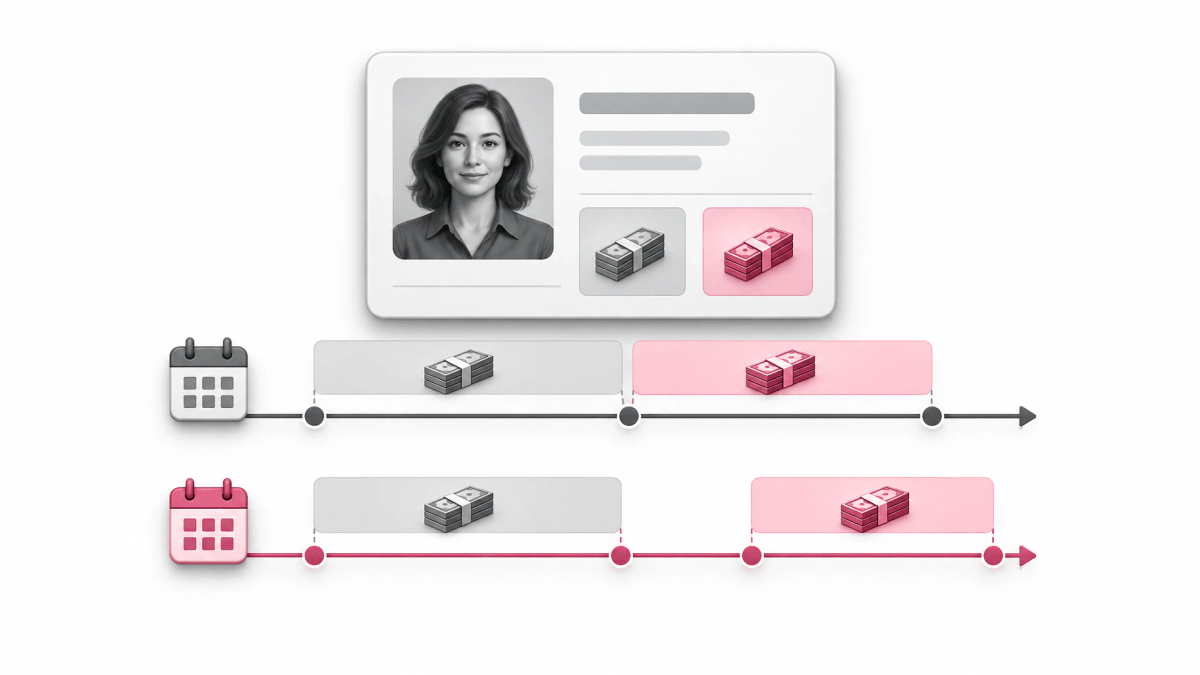
- Valid time
- Transaction time
- Loglune
Bitemporal data is data that carries two independent time axes for every fact: valid time, the period when the fact was true in the real world, and transaction time, the period when the system recorded and believed it. Because the transaction axis only grows, you can correct a past value without erasing what you knew before the correction.
This guide is for developers and data engineers deciding whether a table needs two time axes or whether one is enough. It walks through a correction row by row, shows the as-of query on both axes, compares three ways to store the data, and ends with a run on a feature flag. Tables with a single time axis and SQL:2011 system-versioned syntax are covered in the guide to temporal databases.
What is bitemporal data?
Temporal data is data tied to time: each value carries the time or period it applies to, so you can ask how it changed. A price history with a start and end date per price is temporal data on one axis. Most tables keep one value per row and overwrite it on update. A uni-temporal table adds one time period, so it keeps old values, but it answers only one kind of question: either when a fact held in the world, or when the database held it. Bitemporal data keeps both periods on every row, so it answers two questions about one fact, “what was true on date X” and “what did we think was true on date X, as of date Y”. The cost is more rows, more columns, and more careful queries.
The two timelines are the data as it actually was and the data as it was recorded, and erroneous information is kept rather than discarded. That last property is the reason bitemporal data exists. When you learn that a stored value was wrong, a bitemporal store does not replace it. It ends the old record’s transaction period and adds a new record, so a report you ran last month can be reproduced exactly, and the corrected answer is also available.
The model gives you three things:
- the most accurate data as it is known now
- the data as it was known at any earlier point
- when and why a value changed
The two timelines and their names
Authors on this topic use different words for the same two axes. Reading a source that uses other names is easier with this table.
| Axis | Question it answers | Other names you will see |
|---|---|---|
| Valid time | When was the fact true in the real world? | effective time, actual time, application time, state timeline, effectiveAt |
| Transaction time | When did the system record it? | system time, record time, asserted time, assertion timeline, asAt |
Some sources and their choices:
- Martin Fowler calls the axes actual history and record history, and notes that valid time, effective time, and transaction time are names from Snodgrass and SQL:2011 for the same idea.
- Aiven’s article uses effective time and asserted time, following the Asserted Versioning Framework.
- LUSID uses effectiveAt and asAt, and asAt defaults to the current time.
- Roelant Vos uses the state timeline and the assertion timeline, and relates the assertion side to the load date timestamp (LDTS) in Data Vault. Data warehouse teams that track history with slowly changing dimensions meet the same two questions.
- XTDB uses valid-time and transaction-time, and states that you cannot write a transaction with a transaction-time in the past, while valid-time can be written in the past (retroactive) or the future (proactive).
The XTDB rule is the core asymmetry. Valid time is a business fact, so users may set it to any date. Transaction time is a fact about the system, so the system sets it, and it moves forward only.
A worked example: correcting a salary
Fowler’s salary example shows why one axis is not enough. Payroll pays Sally $6,000 on February 25. On March 15, HR sends a letter saying she got a raise to $6,500, effective February 15. On April 5, HR corrects the raise to $6,400, still effective February 15.
A bitemporal table records each fact with both periods. Here “infinity” means the period is still open.
| Salary | Valid from | Valid to | Recorded from | Recorded to |
|---|---|---|---|---|
| 6000 | Jan 1 | infinity | Jan 1 | Mar 15 |
| 6000 | Jan 1 | Feb 15 | Mar 15 | infinity |
| 6500 | Feb 15 | infinity | Mar 15 | Apr 5 |
| 6400 | Feb 15 | infinity | Apr 5 | infinity |
Three things happen in this table:
- The March 15 letter changes the past on the valid axis: the $6,000 row now ends on February 15. The original row is not edited. Its recorded period is closed, and a new row with the shorter valid period is added.
- The April 5 correction closes the $6,500 row’s recorded period and adds a $6,400 row. Nothing is deleted.
- Every row that was ever believed is still there, with the dates during which it was believed.
Fowler’s section “Append-Only History” states the principle: actual history is no longer append-only once retroactive changes arrive, but record history is append-only. The record axis is what lets you trust the table after corrections.
How to query bitemporal data
A bitemporal query fixes a point on each axis. Fowler writes it as sally.salaryAt('2021-02-25', '2021-03-25'): the salary that was valid on February 25, as the records stood on March 25. Using the table above:
| Valid on | As recorded on | Answer | Why |
|---|---|---|---|
| Feb 25 | Mar 1 | 6000 | Before the letter, the record said $6,000 |
| Feb 25 | Mar 25 | 6500 | After the letter, before the correction |
| Feb 25 | Apr 10 | 6400 | After the correction |
| Feb 10 | Apr 10 | 6000 | Before the raise took effect |
The first row is what payroll knew when it paid Sally. That answer explains the payment that was made. The third row is what is true now, and it drives the back pay. Fowler points out that retroactive changes have consequences such as pay corrections and taxes, and the first and third rows together tell you the size of that correction.
In SQL, the filter is two interval checks. With columns valid_from, valid_to, recorded_from, and recorded_to, the “valid on V, as recorded on R” query is:
SELECT salary
FROM employee_salary
WHERE employee_id = 'sally'
  AND valid_from <= :v AND :v < valid_to
  AND recorded_from <= :r AND :r < recorded_to;
Progress’s MarkLogic article shows the same idea with ranges instead of points. A range query can ask which documents were valid on January 8 to 9 and in the system on January 13 to 14, by comparing the four timestamps with range indexes, and the comparisons can be described in terms of Allen’s interval algebra.
How to store bitemporal data
There are three common designs. They differ in where the two axes live and in what the database enforces for you.
| Design | Record axis enforced by | Valid axis edits | Fits when |
|---|---|---|---|
| Four columns | Your code | Your code | You need it in any database, today |
| Bitemporal table | The database | FOR PORTION OF | Your database supports it and you query with SQL |
| Bitemporal events | The append-only log | Events with an actual date | You already store changes as events |
Four columns in a regular table
Add valid and recorded start and end columns to each row, as in the salary table. This works in any database and in any application language, Python included. Store four timestamps per record, use an open-ended maximum value for “still current”, and filter on both intervals for each query, as in the SQL example above. You enforce the rules yourself:
- Transaction times come from the system clock.
- A correction closes the recorded period of the old record and inserts a new one. Never edit or delete old records, or you lose the record axis.
- No two current rows for the same key overlap in valid time.
The pg_bitemporal approach on PostgreSQL keeps each period in a range type, uses infinity for open periods, and uses GIST exclusion constraints to stop overlaps. It also separates two operations: a bitemporal update records a change that is effective from a date, while a bitemporal correction replaces what was asserted for a past effective period.
A bitemporal table with database support
A bitemporal table is a table where each row has both a valid-time period and a transaction-time period. MariaDB documents bitemporal tables as tables with both an application-time period and system versioning:
CREATE TABLE test.t3 (
   date_1 DATE,
   date_2 DATE,
   row_start TIMESTAMP(6) AS ROW START INVISIBLE,
   row_end TIMESTAMP(6) AS ROW END INVISIBLE,
   PERIOD FOR application_time(date_1, date_2),
   PERIOD FOR system_time(row_start, row_end))
WITH SYSTEM VERSIONING;
The database fills row_start and row_end itself. You change the valid axis with UPDATE ... FOR PORTION OF application_time or DELETE ... FOR PORTION OF application_time, and MariaDB’s application-time page explains that a delete period falling inside a row’s period splits that row into two rows. The same statements against system_time are a syntax error, which is the XTDB rule again: you cannot rewrite the recorded axis. WITHOUT OVERLAPS on a primary key or unique index blocks overlapping valid periods for the same key.
Bitemporal events
Fowler’s other option is event sourcing with bitemporal events. Each event carries a record date, an actual date, an action, and a value:
| Record date | Actual date | Action | Value |
|---|---|---|---|
| Jan 1 | Jan 1 | set salary | 6000 |
| Mar 15 | Feb 15 | set salary | 6500 |
| Apr 5 | Feb 15 | set salary | 6400 |
To answer “valid on V, as recorded on R”, replay only the events recorded on or before R, ordered by actual date, and read the value at V. The event log is append-only by construction, so the record axis comes for free. The event sourcing guide covers replay, projections, and snapshots in detail, and CQRS covers the read models you build from such a log.
Databases that support bitemporal data
A bitemporal database supports both axes natively, so you do not maintain the record axis by hand. Options named in the sources above:
- MariaDB: bitemporal tables combining application-time periods and system versioning, as shown above.
- XTDB: a database built around valid-time and transaction-time, which lists lag, corrections, and auditing as the reasons to use both, with payroll and insurance among its examples.
- MarkLogic: Progress’s article describes MarkLogic 8 tracking valid time and system time with four timestamps per document and queries them through range indexes.
- TerminusDB: a database that implements bitemporal data.
- PostgreSQL with pg_bitemporal: a library that adds bitemporal operations on top of range types and exclusion constraints, as described by Aiven.
LUSID applies the same model to financial data. Its example is a Vodafone price recorded for August 20, 2018 at 10:02 UTC: a later correction keeps the same effectiveAt and gets a new asAt, so both the original and the corrected price remain queryable.
When you need bitemporal data, and when you don’t
You need bitemporal data when three things are true: facts arrive late or get corrected, decisions were made on the earlier values, and someone will later ask why. Typical cases:
- Payroll and HR, where raises and corrections arrive after pay runs (Fowler).
- Insurance and finance, where prices and positions get corrected and reports must be reproducible (XTDB, LUSID).
- Reporting and data warehouses, where a report shows different numbers on rerun. Roelant Vos’s example is a January report that first showed 100 units and later 80, because a -20 adjustment dated January 10 arrived on February 2. Without the assertion timeline, nobody can explain the change.
You can often avoid bitemporal data. Fowler notes that you can refuse retroactive changes altogether, for example by making an insurance change take effect when the letter is received rather than on a past date. Then valid time and transaction time are the same, and one axis is enough. That choice is cheaper, and it works whenever the business can accept “effective from now” for every change. Some systems also add a third axis, such as decision time, which the temporal database guide covers.
Fowler also raises perspectives: HR and payroll may want different answers for the same date, because each acts on what it knew at its own time. Bitemporal data lets each team ask its own as-of question against one store.
Example: recorded time vs shipped time for a feature flag
Feature flags have the same two-question problem during an incident: when did someone change a flag, and when did users start getting the change? If a wrong edit goes out and is later corrected, you also want to know what users were served in between, and that answer must not change after the correction.
Loglune is a feature-flag platform. It stores flag changes as an append-only history of change events: the current state is rebuilt from the whole history, and the state at time T, called a projection, is rebuilt from the history up to T. Edits go to a draft. Publishing turns the draft into an immutable, numbered version with an optional note and report ID. Undoing an edit appends a new edit to the draft that restores the state before it, and the history is an append-only hash chain. Loglune is not a bitemporal database, and it does not let you backdate when a change took effect. It keeps two times apart: when an edit was recorded, and which published version first served it.
The run
The run below is a local run of Loglune’s shipped flag store and console code on workerd’s local D1 and R2 under Vitest, on October 6, 2026, with an editorial example flag, not a customer case. The boolean flag holiday-pricing turns on for accounts whose plan attribute is in a list. The steps:
- On September 14, 2026, pricing@example.com creates the flag for the
proplan at 09:00 UTC, and version 1 is published at 10:00 UTC. - On September 15, the same person adds the
freeplan at 09:00 UTC, and version 2 is published at 09:30 UTC. This is the wrong edit. - At 14:00 UTC, billing-oncall@example.com undoes that edit, and version 3 is published at 14:10 UTC with the note “Correction: the free plan was included by mistake” and the report ID
BILL-311.
The run printed these lines for the three publishes and the undo, copied word for word:
publish version=1 publishedAt=2026-09-14T10:00:00.000Z
publish version=2 publishedAt=2026-09-15T09:30:00.000Z
revert seq=2 kind=reverted newSeq=3 at=2026-09-15T14:00:00.000Z
publish version=3 publishedAt=2026-09-15T14:10:00.000Z
The change events, each with its recorded time and the version that first shipped it:
| seq | Recorded at (UTC) | Actor | Plans before -> after | First shipped in | That version published at (UTC) |
|---|---|---|---|---|---|
| 1 | Sep 14, 09:00 | pricing@example.com | none -> pro | version 1 | Sep 14, 10:00 |
| 2 | Sep 15, 09:00 | pricing@example.com | pro -> pro, free | version 2 | Sep 15, 09:30 |
| 3 | Sep 15, 14:00 | billing-oncall@example.com | pro, free -> pro | version 3 | Sep 15, 14:10 |
The correction is row 3. Row 2 is still there, unchanged. This matches the append-only record history in Fowler’s model: the wrong edit is not rewritten, and the undo is a new event with its own actor and time.
The “first shipped in” column and the hash chain check come from Loglune’s audit log, which is part of the Team Standard plan; see pricing. In this run the chain check returned verified=true count=3 brokenAtSeq=null.
As-of queries on the flag
Projections at four times, run after the correction:
| As of (UTC, Sep 15) | Version live | Published at (UTC) | Plans | Note | Report ID |
|---|---|---|---|---|---|
| 09:15 | 1 | Sep 14, 10:00 | pro | Holiday pricing for the pro plan | none |
| 12:00 | 2 | Sep 15, 09:30 | pro, free | Extend holiday pricing to the free plan | none |
| 14:05 | 2 | Sep 15, 09:30 | pro, free | Extend holiday pricing to the free plan | none |
| 15:00 | 3 | Sep 15, 14:10 | pro | Correction: the free plan was included by mistake | BILL-311 |
Three readings of this table:
- At 09:15 the edit to add
freehad been recorded for 15 minutes, but version 1 was still live. Recorded time and shipped time differ, the same way the record date and the actual date differ in Fowler’s events. - At 14:05 the undo had already been recorded at 14:00, but users were still served version 2 until 14:10. If you only looked at edit times, you would place the end of the incident 10 minutes early.
- At 12:00 the answer is still version 2 with
freeincluded, even though the projection ran after the correction. The correction did not rewrite what was live in the past.
The last point is where Loglune differs from a bitemporal table. In a bitemporal table, you could record the correction with a valid period starting at 09:30, and an as-of-valid-time query for 12:00 would then say “pro only”. Loglune answers a different question: which version users were actually served at 12:00. For incident review and support, that is usually the question you need, because the customers on the free plan did get holiday pricing between 09:30 and 14:10.
Diff of the wrong version and the correction
The diff between version 2 and version 3 for the flag:
flag holiday-pricing change=changed plans before=["pro","free"] after=["pro"]
findings=[]
The publish guard reported no findings for this pair. To reproduce what one customer saw during the window, evaluate the flag against version 2 with the X-Loglune-Version: 2 header, which is available on all plans.
Bitemporal data in short
- Bitemporal data keeps two axes: when a fact was true, and when the system recorded it.
- Corrections close a record’s transaction period and add a new record, so record history stays append-only.
- Queries fix a point on each axis, and the difference between “as known then” and “as known now” sizes the correction.
- You can store it in four columns, in a database with bitemporal tables, or as events with both dates.
- If you can make every change effective from now, one axis is enough.
For feature flags, the useful split is between when an edit was recorded and when a version served it, and Loglune keeps those two apart without rewriting the past. When the fix for a wrong flag edit is to put back the previous state, the git revert guide shows the same append-a-correction idea for code.
Read your flag history as bitemporal data, before and after a correction
Loglune keeps every flag edit as a change event in an append-only history and rebuilds the state at time T from the history up to T. A correction is a new edit and a new published version, so the projection at a time before the correction still returns the version that was live then, with its publish note and report ID. The diff compares the wrong version and the corrected one field by field. Projections and diffs are read operations and do not count toward billing, and the Free plan keeps 7 days of history.